
As the volume of users, conversations, files, and knowledge base data in OpenWebUI continued to grow, the self-hosted PostgreSQL instance on an Azure VM created an increasing operational burden, including database patching, backups, disaster recovery, storage monitoring, and security maintenance.
To reduce maintenance costs and improve database reliability, I migrated the OpenWebUI application database from PostgreSQL running locally on the VM to Azure Database for PostgreSQL Flexible Server.
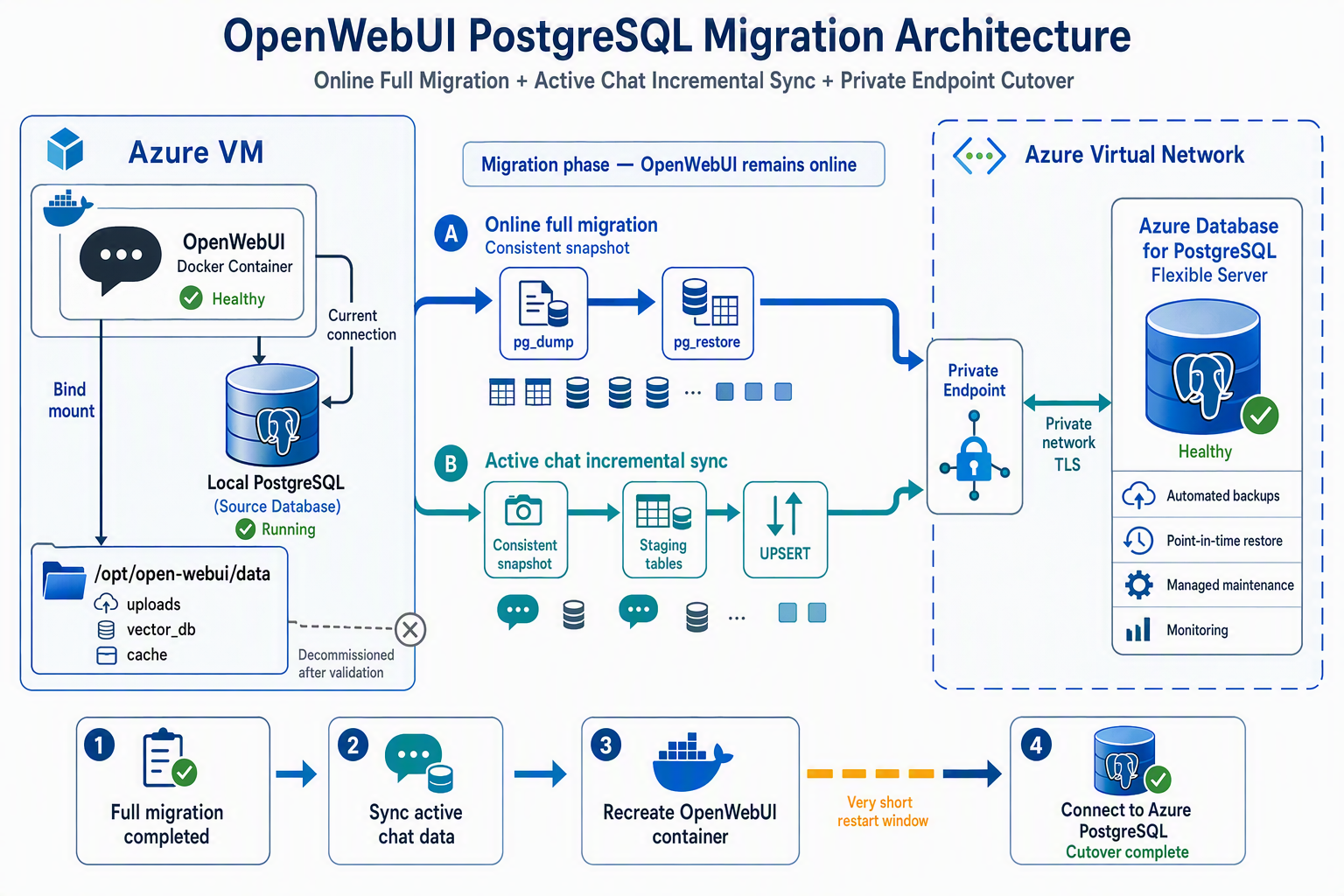
This migration used the following approach:
Online full migration + data consistency validation + incremental synchronization of active conversations + rapid cutover
OpenWebUI remained online throughout the full database dump and restore. The final cutover involved only a brief Docker container recreation, making it almost imperceptible to users.
The server addresses, database names, usernames, passwords, and resource identifiers in this article have been hidden or replaced with placeholders.
Migration Background
OpenWebUI runs as a Docker container on an Azure VM. It originally used PostgreSQL installed on the same VM.
The architecture before migration was as follows:
Users
  │
  ▼
Azure VM
  ├── OpenWebUI Docker container
  │      └── Connects to PostgreSQL on the VM host
  │
  └── PostgreSQL
         └── Data stored on the VM's local disk
This deployment model was relatively simple, but as the application settled into stable operation, database maintenance became a new burden.
The work that had to be handled manually included:
- PostgreSQL security updates and patches
- Database backups and backup rotation
- Data recovery and recovery drills
- Disk capacity monitoring
- Database service monitoring
- PostgreSQL version upgrades
- Incident response
- Network and access permission management
For an application such as OpenWebUI, the database is an important stateful component, but it is not the primary operational focus of the application. Migrating PostgreSQL to an Azure managed service was therefore a more sensible choice.
Architecture After Migration
The architecture after migration is as follows:
Users
  │
  ▼
Azure VM
  └── OpenWebUI Docker container
          │
          ├── Private Endpoint
          │       └── Azure Database for PostgreSQL
          │
          └── Persistent directory on the host
                  ├── uploads
                  ├── vector_db
                  └── cache
The final setup achieved the following:
- OpenWebUI uses Azure managed PostgreSQL
- The database is accessed privately through a Private Endpoint
- TLS is enabled for database connections
- PostgreSQL no longer consumes local ports or disk space on the VM
- OpenWebUI uploads and vector data are stored on persistent mounts
- Azure performs automatic database backups
- Only the PostgreSQL client remains on the VM for routine Azure database administration
Why Choose Azure Database for PostgreSQL?
1. Reduce Database Operational Overhead
Azure Database for PostgreSQL Flexible Server is a managed database service.
Compared with self-hosted PostgreSQL on a VM, Azure handles much of the underlying work, including:
- Database infrastructure maintenance
- Automated backups
- Transaction log backups
- Point-in-time restore
- Monitoring metric collection
- Storage management
- Planned maintenance
- Optional high availability
- Optional read replicas
After the migration, the VM only needs to run OpenWebUI, while Azure manages the database lifecycle.
2. Automated Backups and Point-in-Time Restore
Azure Database for PostgreSQL provides built-in automated backups and continuously backs up transaction logs, supporting Point-in-Time Restore (PITR).
The current environment has an automated backup retention policy configured. If an accidental operation occurs, a new server can be created and restored to a specified point within the retention period.
Compared with maintaining custom pg_dump and Cron scripts, Azure managed backups provide the following advantages:
- No backup scripts to maintain
- No need to rotate backup files manually
- No consumption of local VM disk space
- Restoration to a specific point within the retention period
- Backup operations are managed centrally by the platform
It is important to note that Azure built-in backups are primarily intended for platform-level restoration and are not equivalent to downloadable logical backup files.
If you have any of the following requirements, it is still advisable to run pg_dump periodically:
- Long-term offline archiving
- Cross-platform restoration
- Data auditing
- Cross-subscription or cross-cloud migration
- Retention periods longer than the platform backup policy
3. Private Access Through a Private Endpoint
This migration did not expose PostgreSQL directly to the public internet. Instead, a Private Endpoint was configured for Azure Database for PostgreSQL.
When OpenWebUI accesses the database, the PostgreSQL FQDN resolves through Private DNS to a private IP address in the VNet:
Azure PostgreSQL FQDN
        ↓
Private DNS
        ↓
Private Endpoint IP address
Two levels of validation were performed from inside the OpenWebUI container:
- Whether DNS resolves to a private address
- Whether TCP port 5432 is reachable over the private network
Example:
docker exec -i open-webui python3 - <<'PY'
import socket

host = "<AZURE_POSTGRESQL_PRIVATE_FQDN>"
port = 5432

addresses = sorted({
    item[4][0]
    for item in socket.getaddrinfo(
        host,
        port,
        type=socket.SOCK_STREAM
    )
})

print("Resolved addresses:", addresses)

with socket.create_connection((host, port), timeout=5) as sock:
    print("TCP connection: OK")
    print("Connected peer:", sock.getpeername())
PY
Database security does not come from the Private Endpoint alone. It comes from a combination of the following measures:
- Private Endpoint
- Private DNS
- VNet isolation
- NSG and route controls
- Disabled or restricted public access
- PostgreSQL authentication
- TLS encryption in transit
- A least-privilege database account
4. Enable TLS for Database Connections
The OpenWebUI database connection string uses:
sslmode=require
The sanitized connection string has the following format:
postgresql://<APP_USER>:<PASSWORD>@<AZURE_POSTGRESQL_FQDN>:5432/<APP_DATABASE>?sslmode=require
Before the migration, TLS was also verified in the Python and SQLAlchemy environment used by OpenWebUI:
import os
from sqlalchemy import create_engine, text

engine = create_engine(os.environ["DATABASE_URL"])

with engine.connect() as conn:
    ssl_enabled = conn.execute(text("""
        SELECT ssl
        FROM pg_stat_ssl
        WHERE pid = pg_backend_pid()
    """)).scalar_one()

print("TLS enabled:", ssl_enabled)
For stricter security requirements, you can use:
sslmode=verify-full
This mode not only encrypts the connection but also validates the certificate and server hostname. It requires the CA certificate to be configured correctly and a server FQDN that matches the certificate.
5. Easier Expansion of Reliability Capabilities
After migrating to Azure Database for PostgreSQL, the following capabilities can be configured as OpenWebUI usage grows:
- Compute scaling
- Storage expansion
- Availability zone high availability
- Read replicas
- Slow query analysis
- Database connection monitoring
- CPU, memory, and storage alerts
- Longer backup retention
- Geo-recovery strategies
This upgrades the OpenWebUI database layer from a local service on a single VM to an independent database service managed by Azure.
Migration Goal: Keep OpenWebUI Online as Much as Possible
A traditional migration typically follows this process:
Stop the application
  ↓
Export the database
  ↓
Restore the target database
  ↓
Update the connection configuration
  ↓
Restart the application
Although this approach is simple, downtime increases with the size of the database.
This migration used a different strategy:
Online full database dump
  ↓
Online restore to Azure PostgreSQL
  ↓
Validate schema, permissions, and data
  ↓
Synchronize active conversations created during migration
  ↓
Rapidly recreate the OpenWebUI container
OpenWebUI remained online during all of the following stages:
- Full
pg_dump - Azure PostgreSQL data restoration
- Table schema validation
- Data volume comparison
- Private Endpoint validation
- TLS validation
- Incremental data synchronization
Only the replacement of DATABASE_URL and container recreation caused a brief connection interruption.
More precisely, this was:
A near-zero-downtime OpenWebUI database migration that was almost imperceptible to users.
Pre-Migration OpenWebUI Checks
1. Confirm the Database Type Used by OpenWebUI
First, inspect the OpenWebUI container environment variables:
docker inspect open-webui \
  --format '{{range .Config.Env}}{{println .}}{{end}}' |
grep -E 'DATABASE_URL|DATA_DIR|WEBUI_SECRET_KEY'
Confirm that OpenWebUI is already using PostgreSQL rather than the default SQLite database:
DATABASE_URL=postgresql://<LOCAL_USER>:***@<LOCAL_HOST>:5432/<LOCAL_DATABASE>
Because both the source and target are PostgreSQL, the migration can use:
pg_dump → pg_restore
No SQLite-to-PostgreSQL conversion tool is required.
2. Inspect the Source Database
Check the PostgreSQL version and database size:
sudo -u postgres psql \
  -d <LOCAL_DATABASE> \
  -c "
SELECT
  current_database(),
  current_setting('server_version'),
  pg_size_pretty(
    pg_database_size(current_database())
  );
"
Also check which extensions the source database uses:
sudo -u postgres psql \
  -d <LOCAL_DATABASE> \
  -c "
SELECT extname, extversion
FROM pg_extension
ORDER BY extname;
"
The source database in this migration did not use any additional third-party extensions, reducing the compatibility risk of migrating between environments.
3. Inspect OpenWebUI Local Files
The database does not contain all OpenWebUI data.
An inspection of the container mounts revealed that the original container had no persistent volume configured, while /app/backend/data already contained a significant amount of data:
/app/backend/data
├── cache
├── uploads
└── vector_db
This content includes:
- User-uploaded files
- Vector databases
- Cache data
- Other local application state
These files are not included in a PostgreSQL pg_dump and must therefore be handled separately.
This was a particularly important discovery during the migration:
Migrating the OpenWebUI PostgreSQL database does not mean that all OpenWebUI data has been migrated.
Prepare Azure Database for PostgreSQL
1. Create a Dedicated Application Account
It is not advisable for OpenWebUI to use the Azure PostgreSQL administrator account over the long term.
Create a dedicated role on the target server:
CREATE ROLE <APP_USER> LOGIN;
Set the password interactively through psql to prevent it from appearing in the shell history:
\password <APP_USER>
Then create the target database:
CREATE DATABASE <APP_DATABASE>
OWNER <APP_USER>;
2. Validate the Application Account
psql \
  "host=<AZURE_POSTGRESQL_FQDN> \
   port=5432 \
   dbname=<APP_DATABASE> \
   user=<APP_USER> \
   sslmode=require" \
  -W \
  -c "SELECT current_user, current_database();"
Also confirm that the target database is empty:
SELECT count(*)
FROM information_schema.tables
WHERE table_schema = 'public'
  AND table_type = 'BASE TABLE';
3. Handle public Schema Permissions
The first test restoration encountered this error:
ERROR: permission denied for schema public
The application account could connect to the database but did not have permission to create objects in the public schema.
Connect to the target database with the administrator account and run:
ALTER SCHEMA public OWNER TO <APP_USER>;

GRANT USAGE, CREATE
ON SCHEMA public
TO <APP_USER>;
This issue demonstrates that verifying whether an account can log in is not enough. You must also confirm that it can:
- Create tables
- Create indexes
- Create sequences
- Create constraints
- Run OpenWebUI Alembic database migrations
Perform the Full Database Migration Online
1. Export the OpenWebUI Database Online
PostgreSQL pg_dump exports data from a consistent transactional snapshot, so it can run while OpenWebUI remains online.
sudo -u postgres pg_dump \
  --dbname=<LOCAL_DATABASE> \
  --format=custom \
  --no-owner \
  --no-acl \
  --file=/tmp/openwebui-pre-migration.dump
The parameters mean:
--format=custom: use the PostgreSQL custom archive format--no-owner: do not restore source object ownership--no-acl: do not restore source permissions--file: specify the backup file
Check whether the archive is valid:
pg_restore \
  --list \
  /tmp/openwebui-pre-migration.dump |
head -30
The custom format preserves:
- Table schemas
- Table data
- Primary keys
- Unique constraints
- Indexes
- Foreign keys
- Sequences
- Alembic migration versions
2. Restore to Azure Database for PostgreSQL
pg_restore \
  --host=<AZURE_POSTGRESQL_FQDN> \
  --port=5432 \
  --username=<APP_USER> \
  --dbname=<APP_DATABASE> \
  --no-owner \
  --no-acl \
  --exit-on-error \
  --verbose \
  /tmp/openwebui-pre-migration.dump
Using:
--exit-on-error
ensures that restoration stops immediately when an error occurs instead of ignoring a critical problem.
After a successful restoration, update the statistics:
psql \
  "host=<AZURE_POSTGRESQL_FQDN> \
   port=5432 \
   dbname=<APP_DATABASE> \
   user=<APP_USER> \
   sslmode=require" \
  -W \
  -c "ANALYZE;"
Compare Data Between the Source and Target
After the restoration is complete, compare the core OpenWebUI tables.
Example query:
SELECT
  (SELECT count(*) FROM "user") AS users,
  (SELECT count(*) FROM chat) AS chats,
  (SELECT count(*) FROM chat_message) AS chat_messages,
  (SELECT count(*) FROM file) AS files,
  (SELECT count(*) FROM knowledge) AS knowledge,
  (
    SELECT count(*)
    FROM information_schema.tables
    WHERE table_schema = 'public'
      AND table_type = 'BASE TABLE'
  ) AS tables;
Key items to check include:
- Number of users
- Number of conversations
- Number of messages
- Number of file records
- Number of knowledge bases
- Number of application tables
- Alembic version
- Table owners
- Sequence states
The comparison revealed that the target contained slightly fewer conversation messages than the source.
This was not a restoration failure. It happened because:
OpenWebUI remained online during the full backup and restoration, and the active conversation used for the migration work continued to generate new messages.
The next step was therefore to synchronize the data created after the full snapshot.
Synchronize Active Conversation Updates During Migration
During this migration, only the current working conversation was still being updated. Instead of restoring the entire database again, only the active conversation was synchronized.
Two tables were involved:
chat
chat_message
1. Find the Most Recently Updated Conversation
SELECT
  c.id,
  c.title,
  to_timestamp(c.updated_at) AS updated_at,
  count(cm.id) AS message_count
FROM chat c
LEFT JOIN chat_message cm
  ON cm.chat_id = c.id
GROUP BY
  c.id,
  c.title,
  c.updated_at
ORDER BY c.updated_at DESC
LIMIT 5;
After identifying the active conversation, subsequent scripts receive its ID through an environment variable or argument rather than embedding it directly in public documentation:
CHAT_ID="<ACTIVE_CHAT_ID>"
2. Export Conversation Data from a Consistent Snapshot
To ensure that chat and chat_message come from the same point in time, use a read-only, repeatable-read transaction:
BEGIN TRANSACTION
ISOLATION LEVEL REPEATABLE READ
READ ONLY;
Then export both tables in the same transaction:
\copy (
  SELECT *
  FROM chat
  WHERE id = '<ACTIVE_CHAT_ID>'
) TO '/tmp/chat.csv'
WITH (FORMAT CSV);
\copy (
  SELECT *
  FROM chat_message
  WHERE chat_id = '<ACTIVE_CHAT_ID>'
  ORDER BY created_at, id
) TO '/tmp/chat-messages.csv'
WITH (FORMAT CSV);
Finally, commit the transaction:
COMMIT;
Note that psql \copy is a client-side meta-command. Complex field lists are best written on one line; otherwise, the following error may occur:
\copy: parse error at end of line
3. Use Temporary Tables and UPSERT in Azure
Create temporary staging tables on the target:
CREATE TEMP TABLE stage_chat
(LIKE public.chat INCLUDING DEFAULTS);

CREATE TEMP TABLE stage_chat_message
(LIKE public.chat_message INCLUDING DEFAULTS);
After importing the CSV files into the temporary tables, perform an UPSERT on the primary chat record:
INSERT INTO public.chat (...)
SELECT ...
FROM stage_chat
ON CONFLICT (id) DO UPDATE SET
  title              = EXCLUDED.title,
  updated_at         = EXCLUDED.updated_at,
  chat               = EXCLUDED.chat,
  meta               = EXCLUDED.meta,
  current_message_id = EXCLUDED.current_message_id;
Perform a similar operation on the message table:
INSERT INTO public.chat_message (...)
SELECT ...
FROM stage_chat_message
ON CONFLICT (id) DO UPDATE SET
  content         = EXCLUDED.content,
  output          = EXCLUDED.output,
  status_history  = EXCLUDED.status_history,
  error           = EXCLUDED.error,
  usage           = EXCLUDED.usage,
  done            = EXCLUDED.done,
  updated_at      = EXCLUDED.updated_at,
  context_summary = EXCLUDED.context_summary;
To make the conversation’s message set in Azure exactly match the source snapshot, delete any extra records from the target:
DELETE FROM public.chat_message target
WHERE target.chat_id = '<ACTIVE_CHAT_ID>'
  AND NOT EXISTS (
    SELECT 1
    FROM stage_chat_message staged
    WHERE staged.id = target.id
  );
Run the entire import and UPSERT process in a single transaction:
BEGIN;

-- Create temporary tables
-- Import data
-- UPSERT
-- Remove extra records

COMMIT;
If any step fails, the transaction rolls back automatically and leaves no partially synchronized data behind.
Perform the Final Rapid OpenWebUI Cutover
After completing the online full migration, the final procedure was:
Synchronize the active conversation one last time
              ↓
Recreate the OpenWebUI container
              ↓
The new container connects to Azure PostgreSQL
Example:
./sync-active-chat-to-azure.sh && \
docker compose \
  -f run-with-azure-pg.yml \
  up -d --force-recreate
The complete database had already been migrated and validated, so there was no need to wait for hundreds of megabytes of data to be restored again during the final stage. Only a small number of incremental records had to be synchronized before the container was recreated quickly.
This reduced the cutover window to the time required for the container to start.
Store the OpenWebUI Database Connection String Securely
The database connection string was not written directly into the Compose file. It was stored in a separate environment file:
open-webui-azure-db.env
The file has the following format:
DATABASE_URL=postgresql://<APP_USER>:<URL_ENCODED_PASSWORD>@<AZURE_POSTGRESQL_FQDN>:5432/<APP_DATABASE>?sslmode=require
Set the file permissions to:
chmod 600 open-webui-azure-db.env
If the password contains special characters, URL-encode it first:
python3 - <<'PY'
import getpass
import urllib.parse

password = getpass.getpass("Database password: ")
print(urllib.parse.quote(password, safe=""))
PY
Example of the new Compose file:
services:
  open-webui:
    image: ghcr.io/open-webui/open-webui:<VERSION>
    container_name: open-webui
    restart: always

    ports:
      - "8080:8080"

    env_file:
      - ./open-webui.env
      - ./open-webui-azure-db.env

    volumes:
      - /opt/open-webui/data:/app/backend/data
Persist OpenWebUI Local Files
Before the migration, OpenWebUI’s /app/backend/data directory was not mounted on the host.
First, copy the data out of the container:
sudo install \
  -d \
  -m 700 \
  -o "$(id -un)" \
  -g "$(id -gn)" \
  /opt/open-webui/data
docker cp \
  open-webui:/app/backend/data/. \
  /opt/open-webui/data/
Add the following to the Compose file:
volumes:
  - /opt/open-webui/data:/app/backend/data
This ensures that the following content is retained even if the OpenWebUI container is recreated or upgraded in the future:
- Uploaded files
- Vector databases
- Cache data
- Other local application data
Verify after migration:
docker inspect open-webui \
  --format '{{range .Mounts}}{{println .Source "->" .Destination "rw=" .RW}}{{end}}'
Expected output:
/opt/open-webui/data -> /app/backend/data rw=true
Post-Migration Validation
1. OpenWebUI Health Check
curl \
  -sS \
  -o /dev/null \
  -w 'HTTP %{http_code}\n' \
  --max-time 10 \
  http://127.0.0.1:8080/health
Expected output:
HTTP 200
2. Verify the Database Currently Used by OpenWebUI
To avoid exposing the password, parse only the non-sensitive parts of the connection string:
docker exec -i open-webui python3 - <<'PY'
import os
from urllib.parse import urlsplit

u = urlsplit(os.environ["DATABASE_URL"])

print("Database host configured:", bool(u.hostname))
print("Database port:", u.port)
print("TLS required:", "sslmode=require" in u.query)
PY
Key validation points:
- The host no longer points to PostgreSQL on the local VM
- The port is 5432
sslmode=requireis enabled
3. Inspect Startup Logs
docker logs \
  --since 15m \
  open-webui 2>&1 |
grep -Ei \
  'error|fatal|exception|traceback|permission denied|database|postgres|alembic|ssl|timeout'
Under normal conditions, only messages similar to the following should appear:
INFO [alembic.runtime.migration] Context impl PostgresqlImpl.
INFO [alembic.runtime.migration] Will assume transactional DDL.
The following should not appear:
- Database connection failures
- Password authentication failures
- TLS errors
- Schema permission errors
- Alembic migration failures
- Python tracebacks
Uninstall PostgreSQL from the VM
After confirming that OpenWebUI is stably connected to Azure Database for PostgreSQL, the local PostgreSQL installation can be removed from the VM.
First, confirm that:
- The OpenWebUI health check succeeds
- The database connection has been switched
- Azure Database for PostgreSQL contains the latest data
- The automated backup policy is enabled
- No application connections remain on the local PostgreSQL instance
Stop and remove the local cluster:
sudo pg_dropcluster \
  --stop \
  <POSTGRESQL_VERSION> \
  main
Uninstall the PostgreSQL server packages:
sudo apt-get purge -y \
  postgresql \
  postgresql-<POSTGRESQL_VERSION> \
  postgresql-contrib
Remove leftover data and configuration:
sudo rm -rf \
  /var/lib/postgresql \
  /etc/postgresql \
  /var/log/postgresql
The PostgreSQL client packages can remain installed:
postgresql-client
postgresql-client-common
This allows Azure Database for PostgreSQL to continue being administered from the VM with psql.
Finally, check local port 5432:
if sudo ss -lntp | grep -q ':5432'; then
  sudo ss -lntp | grep ':5432'
else
  echo "No local PostgreSQL listener"
fi
Lessons Learned During Migration
1. Database Migration Does Not Mean All OpenWebUI Data Has Been Migrated
In addition to PostgreSQL, OpenWebUI may store the following in /app/backend/data:
- Uploaded files
- Vector databases
- Cache data
- Local state files
Running pg_dump alone does not migrate this content.
2. Do Not Test Port Connectivity Alone
A successful nc connection proves only that TCP port 5432 is reachable. It does not prove that:
- The PostgreSQL user can log in
- The password is correct
- TLS works correctly
- Database permissions are correct
- The driver used by OpenWebUI is compatible
At minimum, complete the following validation chain:
DNS → TCP → PostgreSQL login → TLS → SQL query → Actual OpenWebUI connection
3. Database Ownership Does Not Necessarily Grant Schema Creation Permission
Even if the application user owns the database, it may still encounter:
permission denied for schema public
Before migration, verify that the application account has:
USAGECREATE- Ownership of tables and sequences
- Permission to run Alembic DDL
4. Incremental Writes Must Be Handled After an Online Full Backup
pg_dump provides a consistent snapshot from the start of the backup.
Conversations and messages created by OpenWebUI during the backup are not automatically added to a dump that has already completed. An online migration must therefore include one of the following mechanisms:
- A new full backup after writes are stopped
- Logical replication
- CDC
- Application dual writes
- Incremental synchronization by application object
This migration used a “full snapshot + active conversation UPSERT” approach.
5. Do Not Upgrade OpenWebUI During the Migration
The OpenWebUI image version remained unchanged throughout this migration.
If the application is upgraded at the same time as the database migration, any problem becomes difficult to attribute. It could come from:
- The PostgreSQL version
- Data migration
- Azure networking
- Database permissions
- The OpenWebUI version
- Alembic schema changes
A safer approach is:
Migrate the database and stabilize it first
          ↓
Upgrade OpenWebUI separately afterward
Is This Truly Zero Downtime?
From the user’s perspective, this migration was close to zero downtime:
- The full backup was completed online
- The target database was restored online
- Data validation was completed online
- The active conversation was synchronized online
- The OpenWebUI container was recreated only once at the end
Under a strict engineering definition, however, true zero downtime also requires:
- New connections can be accepted at all times
- No writes at the final moment can be lost
- There is no single-instance container restart window
- Client connections are never interrupted
- Automated traffic switching is available
Larger OpenWebUI deployments can consider:
- PostgreSQL logical replication
- Azure Database Migration Service
- CDC-based incremental migration
- Application dual writes
- Blue-green deployment
- Multiple OpenWebUI instances
- Reverse proxy health checks
- Connection draining and traffic switching
For a single VM, a single OpenWebUI container, and a small-to-medium database, this approach achieved a good balance among complexity, risk, and downtime.
Routine Operations After Migration
Start OpenWebUI:
docker compose \
  -f run-with-azure-pg.yml \
  up -d
Check its status:
docker compose \
  -f run-with-azure-pg.yml \
  ps
View logs:
docker compose \
  -f run-with-azure-pg.yml \
  logs -f --tail=200
Run a health check:
curl \
  -sS \
  -o /dev/null \
  -w 'HTTP %{http_code}\n' \
  http://127.0.0.1:8080/health
Routine monitoring should also focus on the following Azure Database for PostgreSQL metrics and events:
- CPU utilization
- Memory usage
- Storage space
- Number of active connections
- Number of failed connections
- Query latency
- Automated backup status
- Maintenance events
- Private Endpoint status
Conclusion
This migration smoothly moved the OpenWebUI database from self-hosted PostgreSQL on an Azure VM to Azure Database for PostgreSQL Flexible Server.
The final setup achieved:
- An OpenWebUI database managed by Azure
- Private access through a Private Endpoint
- TLS-enabled database connections
- Automated backups and point-in-time restore
- Persistent OpenWebUI local files
- Complete decommissioning of PostgreSQL on the VM
- Closure of local port 5432
- Continuous application availability during the full migration
- Minimal user impact during the final cutover
The most important lesson from this migration is:
A low-downtime database migration for OpenWebUI should not focus only on
pg_dumpandpg_restore. It must also account for incremental writes, Private Endpoint connectivity, TLS, database permissions, Alembic migrations, and local files in/app/backend/data.
By combining online full migration, target-side pre-validation, incremental synchronization of active data, and rapid container cutover, a small-to-medium OpenWebUI deployment can be migrated smoothly to Azure managed PostgreSQL without introducing a complex CDC platform.