Background

Recently, a Linux server deployed on Azure suddenly started showing sustained 100% CPU usage. After investigation, I found a malicious program running as the postgres user, with persistence maintained through a cron scheduled task.
The PostgreSQL installation on this server had the following characteristics:
- Port
5432was not exposed to the public internet through Azure NSG; - PostgreSQL was not used by the current business workload;
- The actual business workload used local MySQL;
- However, the PostgreSQL service was still installed and running;
- The system still retained the
postgresuser, home directory, cron jobs, and historical scripts.
This incident shows that:
PostgreSQL not being exposed to the public internet does not mean that PostgreSQL-related components on the server are completely risk-free.
It is important to clarify that the current evidence only proves that the malicious program used the postgres operating system user and its directories for persistence. It does not prove that the attacker necessarily entered the server through PostgreSQL port 5432. The initial entry point could also have been historical configuration, SSH, a web application, containers, an old image, or another vulnerability.
If a production environment truly needs PostgreSQL, but there is no special requirement to self-host the database server, I recommend prioritizing:
Azure Database for PostgreSQL, accessed through a private network with public network access disabled.
This can reduce the risks introduced by self-hosting a database, including operating system users, SSH, cron, systemd, patching, backups, and host intrusion.
Discovering the Issue: Sustained 100% CPU Usage
The abnormal behavior was first noticed while running htop on the server.
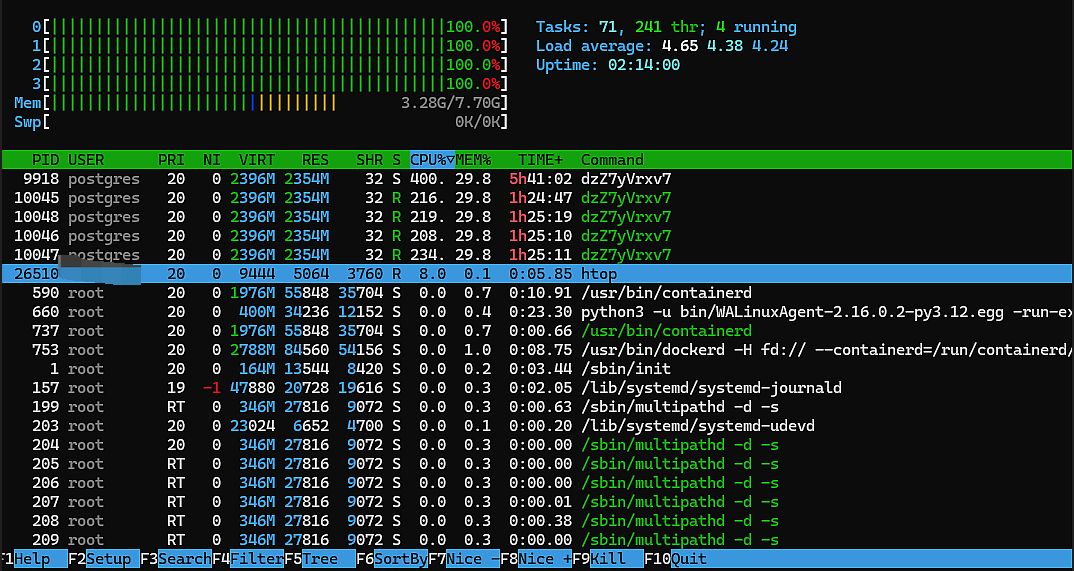
From the screenshot, we can see that:
- The server had 4 CPU cores;
- All 4 cores reached
100%; - The load average stayed around 4 for a long time;
- Multiple processes were running as the
postgresuser; - The process name was a random string,
dzZ7yVrxv7; - A single process used more than
200%CPU; - The process consumed a large amount of memory.
I then ran:
sudo ps -eo user,pid,ppid,lstart,etime,%cpu,%mem,stat,comm,args \
  --sort=-%cpu | head -20
One of the main processes looked like this:
USER       PID   PPID  %CPU  %MEM  STAT  COMMAND
postgres   9918     1   377  29.8  Ssl   dzZ7yVrxv7
This was not a normal PostgreSQL process.
Under normal circumstances, PostgreSQL process names are usually similar to:
postgres
postgres: checkpointer
postgres: background writer
postgres: walwriter
postgres: autovacuum launcher
This process had several abnormal characteristics:
- Its name was a random string;
- It was running as the
postgresuser; - Its CPU usage was close to all 4 cores;
- Its parent process had become PID 1;
- Its memory usage was unusually high.
Therefore, the initial assessment was that this was not normal database load, but a suspected mining program or another type of malware.
Analyzing the Issue: Confirming the Malware Source
1. Check the Real Process File
Linux process names can be modified or disguised, so the COMMAND field alone is not trustworthy. The real executable should be checked through /proc/<PID>/exe.
I ran:
sudo sh -c '
echo "EXE:"
ls -l /proc/9918/exe

echo "CWD:"
ls -l /proc/9918/cwd

echo "CMDLINE:"
tr "\0" " " < /proc/9918/cmdline
echo

echo "CGROUP:"
cat /proc/9918/cgroup
'
The output was:
EXE:
/proc/9918/exe -> /dev/shm/gJppJl6TbG (deleted)

CWD:
/proc/9918/cwd -> /var/lib/postgresql

CMDLINE:
dzZ7yVrxv7

CGROUP:
0::/system.slice/cron.service
These pieces of information are critical.
The Executable Was Located in /dev/shm
The real program path was:
/dev/shm/gJppJl6TbG
/dev/shm is a memory-backed temporary filesystem. Malware often downloads files there and executes them from the in-memory filesystem to reduce traces on disk.
The Original File Had Already Been Deleted
The path ended with:
(deleted)
This means that after the program started, the original file on disk was deleted. However, because the process still held the file, the program could continue running.
This behavior, deleting itself after startup, is a common malware hiding technique.
The Working Directory Belonged to the PostgreSQL User
The process working directory was:
/var/lib/postgresql
This indicates that the malware was related to the postgres user’s home directory.
The Process Was Started by Cron
The cgroup showed:
/system.slice/cron.service
This means the program was started through a scheduled task.
2. Save a Sample from the Running Process
Because the original file had already been deleted, killing the process immediately might have made it impossible to extract a sample. So I first saved the program from /proc:
sudo mkdir -p /root/incident
sudo chmod 700 /root/incident

sudo cp -L /proc/9918/exe \
  /root/incident/suspect-9918.bin

sudo chmod 600 \
  /root/incident/suspect-9918.bin
Then I checked the file type:
sudo file /root/incident/suspect-9918.bin
The result was:
ELF 64-bit LSB shared object, x86-64,
statically linked, no section header
I calculated the SHA-256 hash:
sudo sha256sum /root/incident/suspect-9918.bin
The hash was:
d32f9eef63c496a146a6a811677dd27e337db993d6f1a4b1af145c3135d391b3
This file had the following characteristics:
- Random file name;
- Located in
/dev/shm; - Statically linked;
- No section header;
- Deleted its original file after startup;
- Continuously consumed all CPU resources.
These behaviors further confirmed that it was not a normal PostgreSQL component.
3. Check the PostgreSQL User’s Scheduled Tasks
Because the process was started from cron.service, I continued by checking the postgres user’s crontab:
sudo crontab -u postgres -l
I found the following task:
24 * * * * /var/lib/postgresql/.dbus-XGodM5jOyL
This task executed a hidden script at minute 24 of every hour:
/var/lib/postgresql/.dbus-XGodM5jOyL
The file name used a dot-prefixed hidden form and imitated D-Bus naming, making it easy to mistake for a system file.
I checked the cron logs:
sudo journalctl -u cron.service \
  --since "2026-08-15 07:15:00" \
  --until "2026-08-15 09:15:00" \
  --no-pager
The logs showed:
Aug 15 07:24:01 CRON: (postgres) CMD (/var/lib/postgresql/.dbus-XGodM5jOyL)
Aug 15 08:24:01 CRON: (postgres) CMD (/var/lib/postgresql/.dbus-XGodM5jOyL)
This proves that the malicious script was executed at least at 07:24 and 08:24.
4. Analyze the Malicious Startup Script
I checked the file:
sudo file /var/lib/postgresql/.dbus-XGodM5jOyL
sudo stat /var/lib/postgresql/.dbus-XGodM5jOyL
sudo sha256sum /var/lib/postgresql/.dbus-XGodM5jOyL
The result showed that it was a Bash script:
Bourne-Again shell script, ASCII text executable,
with very long lines
Its SHA-256 hash was:
36b1dcf43876f55aae2b8be7dada848b41f60ec61cd4ca7ab2a1278193f286f0
This script was responsible for downloading, starting, or restoring the malicious program. It was also the main persistence mechanism that allowed the malicious process to reappear periodically.
If the high-CPU process were killed without cleaning this cron job, the malware would appear again at minute 24 of the next hour.
5. Find a Second Malicious Downloader in the User Directory
After stopping and uninstalling PostgreSQL, I continued checking the remaining files under /var/lib/postgresql:
sudo find /var/lib/postgresql \
  -xdev -maxdepth 10 -ls
I found another suspicious file:
/var/lib/postgresql/.config/systemd/user/
`-- systemd-tmpfiles-cleanup/
  `-- systemd-tmpfiles-cleanup-TNWow7.sh
This file used:
systemd-tmpfiles-cleanup
as a directory name, trying to disguise itself as a normal systemd temporary file cleanup component.
I checked the file type and hash:
sudo file \
  /var/lib/postgresql/.config/systemd/user/systemd-tmpfiles-cleanup/systemd-tmpfiles-cleanup-TNWow7.sh

sudo sha256sum \
  /var/lib/postgresql/.config/systemd/user/systemd-tmpfiles-cleanup/systemd-tmpfiles-cleanup-TNWow7.sh
The result was:
Bourne-Again shell script, ASCII text executable,
with very long lines
SHA-256:
9962de5e0c68ea6e85879c5f62f2d0806360dbe186dc15e1d59abf8e4209de11
The script content was Base64-encoded, and the end of the script executed it directly:
base64 -d | bash
The decoded logic showed the following behaviors:
- Connects to external addresses through Tor, SOCKS5, or Tor2web;
- Retrieves the server’s public IP address;
- Collects the current username, hostname, and kernel version;
- Reads the machine ID;
- Downloads additional programs from external locations;
- Tests and executes files in directories such as
/dev/shm,/tmp, and/var/tmp; - Deletes temporary files after starting programs.
This was no longer just a simple high-CPU process. It was a malware set with downloading, execution, hiding, and persistence capabilities.
Why Is There Still Risk If PostgreSQL Is Not Exposed to the Public Internet?
At that time, the Azure network security group only allowed public access to:
- TCP 22;
- TCP 80;
- TCP 443.
It did not allow direct public access to PostgreSQL port 5432.
However, when checking local listening sockets on the server, I found:
sudo ss -lntp | grep ':5432'
Output:
LISTEN 0 244 0.0.0.0:5432 0.0.0.0:*
LISTEN 0 244 [::]:5432    [::]:*
This means PostgreSQL was listening on all IPv4 and IPv6 network interfaces at the operating system level.
Although Azure NSG did not allow public inbound access to 5432, the following risks still existed.
1. Hosts in the Same Virtual Network Might Still Access It
Azure NSG has a default AllowVnetInBound rule. Other servers in the same virtual network may be able to access this port.
If another server in the same VNet is compromised, the attacker may continue attacking the database server through the internal network.
2. Local Applications or Containers Might Still Access It
Even if the public internet cannot connect to PostgreSQL, the following components running on the same server may still access it:
- Web applications;
- Docker containers;
- CI/CD agents;
- Other compromised services;
- Local malware.
A network security group cannot prevent local server processes from accessing the local database.
3. The Risk Does Not Only Come from the Database Port
In this incident, the actual persistence locations were:
- The
postgresuser’s crontab; - The
/var/lib/postgresqluser directory; - User-level systemd configuration directories;
- The
/dev/shmtemporary execution directory.
Even if the PostgreSQL service is stopped, the malware may continue running as long as these users, directories, and scheduled tasks remain.
Therefore, the security boundary of a database is not only port 5432. It also includes:
- Operating system accounts;
- Data directories;
- User home directories;
- cron;
- systemd;
- SSH;
- Software packages;
- Configuration files;
- Historical images and backups.
4. Unused Software Is Often Easier to Ignore
The business workload on this server actually used MySQL. PostgreSQL had no business purpose.
Because it was “unused,” it was more likely to remain in the following state for a long time:
- Nobody checked its configuration;
- Nobody checked its system user;
- Nobody checked its database logs;
- Nobody checked the user’s cron jobs;
- Nobody checked related directories;
- Nobody confirmed whether it was still needed;
- Nobody paid attention to its patches and version.
Therefore:
Software that is unused but still installed and running is not standby capability. It is unmanaged attack surface.
Resolving the Issue: Remove the Malware and Uninstall PostgreSQL
1. Pause the Malicious Process
After preserving evidence, I first paused the process:
sudo kill -STOP 9918
Then I checked the process state:
ps -p 9918 \
  -o user,pid,ppid,%cpu,%mem,stat,comm,args
The state showed T, meaning the process had been paused.
Pausing had several benefits:
- Immediately stopped further CPU consumption;
- Temporarily stopped potential network behavior;
- Kept the process available for continued investigation;
- Avoided losing the in-memory sample before evidence collection was complete.
2. Back Up and Delete the Malicious Cron Job
First, I saved the crontab:
sudo crontab -u postgres -l \
  > /root/incident/postgres-crontab.txt
Then I deleted it:
sudo crontab -u postgres -r
I confirmed that it had been removed:
sudo crontab -u postgres -l
Expected output:
no crontab for postgres
3. Isolate the Malicious Startup Script
First, I backed up the script:
sudo cp -a \
  /var/lib/postgresql/.dbus-XGodM5jOyL \
  /root/incident/cron-payload
Then I moved it away from its original location:
sudo mv \
  /var/lib/postgresql/.dbus-XGodM5jOyL \
  /root/incident/original-dbus-XGodM5jOyL
I restricted permissions on the evidence files:
sudo chown root:root \
  /root/incident/original-dbus-XGodM5jOyL \
  /root/incident/cron-payload

sudo chmod 600 \
  /root/incident/original-dbus-XGodM5jOyL \
  /root/incident/cron-payload
4. Kill the Malicious Process
After confirming that the malicious cron job and startup script had been isolated, I killed the process:
sudo kill -KILL 9918
I checked whether the process had disappeared:
ps -p 9918 \
  -o user,pid,ppid,%cpu,%mem,stat,comm,args
Then I checked the system load:
uptime
After cleanup, the load became:
load average: 0.36, 2.71, 3.68
The 1-minute load had dropped from above 4 to 0.36.
The 5-minute and 15-minute loads were still high, which is normal because they reflect averages over a period of time and will gradually decrease.
5. Stop and Disable PostgreSQL
Because the business workload did not use PostgreSQL, I first stopped it and disabled it from starting at boot:
sudo systemctl disable --now postgresql
I confirmed the service status:
systemctl status postgresql --no-pager
I confirmed that the port was no longer listening:
sudo ss -lntp | grep ':5432' \
  || echo "Port 5432 is not listening"
The final result was:
Port 5432 is not listening
6. Uninstall PostgreSQL
After confirming that the business workload was not affected, I removed the PostgreSQL-related packages:
sudo apt-get purge -y \
  postgresql \
  postgresql-14 \
  postgresql-client-14 \
  postgresql-client-common \
  postgresql-common \
  postgresql-contrib
It is important to note that:
Uninstalling packages is not the same as completing malware cleanup.
You should continue checking the following locations:
/var/lib/postgresql
/etc/postgresql
/etc/postgresql-common
/var/spool/cron
/tmp
/var/tmp
/dev/shm
/home/*/.config/systemd
The second malicious downloader in this incident was found while checking remaining directories after PostgreSQL had been uninstalled.
7. Isolate the Second Malicious Downloader
I moved the script that disguised itself as a systemd cleanup task into the evidence directory:
sudo mv \
  /var/lib/postgresql/.config/systemd/user/systemd-tmpfiles-cleanup/systemd-tmpfiles-cleanup-TNWow7.sh \
  /root/incident/systemd-tmpfiles-cleanup-TNWow7.sh
Then I restricted permissions:
sudo chown root:root \
  /root/incident/systemd-tmpfiles-cleanup-TNWow7.sh

sudo chmod 600 \
  /root/incident/systemd-tmpfiles-cleanup-TNWow7.sh
Then I searched for similar files:
sudo grep -RIlE \
  'TNWow7|XGodM5jOyL|tor2socks|tor2web|relay\.tor2socks' \
  /etc \
  /var/spool/cron \
  /var/lib/postgresql \
  /tmp \
  /var/tmp \
  /dev/shm \
  /home \
  2>/dev/null
Azure Network Security Remediation
1. There Was No Need to Delete a Nonexistent 5432 Inbound Rule
There was originally no Azure NSG rule allowing public access to 5432, so there was no PostgreSQL inbound rule that needed to be deleted.
After PostgreSQL was stopped and uninstalled, the server was no longer listening on 5432 locally either.
However, the absence of an NSG rule for 5432 does not mean the server is safe.
2. Restrict SSH Inbound Access
During the investigation, SSH logs showed multiple public IP addresses attempting passwords for the postgres user:
Failed password for postgres from 172.83.83.194
Failed password for postgres from 101.36.110.41
These records show failed logins and do not prove that the attackers successfully logged in through SSH. However, they do show that the server’s SSH service was being continuously scanned from the public internet.
The original Azure SSH rule was:
Source: Any
Destination port: 22
Action: Allow
It is recommended to change it to:
Source: administrator fixed public IP/32
Destination port: 22
Protocol: TCP
Action: Allow
More secure options include:
- Azure Bastion;
- VPN;
- Just-In-Time VM Access;
- Disabling SSH password login;
- Using SSH keys only;
- Disabling remote root login;
- Configuring failed-login alerts.
3. Restrict Server Outbound Access
The malicious script needed to connect to external addresses to download programs, while the Azure NSG allowed unrestricted outbound access at the time.
If business requirements allow it, the server’s outbound scope should be restricted:
- Allow only necessary DNS;
- Allow only necessary package repositories;
- Allow only APIs required by the business workload;
- Use Azure Firewall or a centralized proxy;
- Record DNS and outbound network logs;
- Create alerts for Tor, proxies, mining pools, and abnormal domains.
Restricting inbound traffic alone is not enough. Once malware enters a server, it usually still needs outbound network access to download payloads, connect to command-and-control servers, or connect to mining pools.
Why Use Azure Managed PostgreSQL?
If the business truly needs PostgreSQL, I recommend prioritizing:
Azure Database for PostgreSQL
instead of installing PostgreSQL directly on an Azure VM.
1. Reduce the Operating System Attack Surface
When self-hosting PostgreSQL on a VM, you need to maintain:
- The Linux operating system;
- PostgreSQL packages;
- The
postgressystem user; - SSH;
- cron;
- systemd;
- Data directory permissions;
- Security patches;
- Version upgrades;
- Network firewalls;
- Logs;
- Backups;
- High availability;
- Malicious process detection.
After using Azure managed PostgreSQL, users do not directly manage root access to the database host, and they do not create cron jobs, systemd services, or programs running from /dev/shm on the database host.
This can significantly reduce the host-level risks seen in this incident.
2. Use a Private Network and Disable Public Access
The recommended network architecture is:
Azure VM / App Service / AKS
          |
      Private Network
          |
Azure Database for PostgreSQL
The database should be configured to:
- Disable public network access;
- Use Private Endpoint or private network integration;
- Allow access only from the application subnet;
- Avoid exposing the database port to the public internet;
- Perform database administration through VPN, Bastion, or a controlled network.
3. Automatic Backup and Maintenance
Azure managed PostgreSQL can provide:
- Automatic backups;
- Point-in-time restore;
- High availability options;
- Data encryption;
- Monitoring metrics;
- Logs and alerts;
- Platform maintenance;
- Security updates;
- Version support.
These capabilities can reduce risks caused by long-term lack of maintenance.
4. Clearer Responsibility Boundaries
Self-hosted PostgreSQL often leads to this situation:
It was temporarily installed for testing. Later, the business stopped using it, but the service, user, and directories remained on the server.
A managed database has clearer resource boundaries:
- Create it when needed;
- Connect through a private network;
- Export data when it is no longer used;
- Delete the database instance;
- Delete access permissions and private connections;
- Avoid leaving database system users and historical scripts on business VMs.
5. Managed Service Does Not Mean Absolute Security
Azure managed PostgreSQL can reduce operating system and infrastructure maintenance risks, but you still need to properly manage:
- Database accounts;
- Strong passwords or identity authentication;
- Least privilege;
- Network access scope;
- SQL injection;
- Connection strings;
- Azure Key Vault;
- Log auditing;
- Data encryption;
- Application dependencies;
- Credential rotation.
The correct understanding is:
Azure managed PostgreSQL reduces the security scope you need to manage yourself, but it does not eliminate security responsibility at the application and account layers.
IOCs from This Incident
The following indicators can be used for internal server checks.
Suspicious Processes and File Names
dzZ7yVrxv7
gJppJl6TbG
.dbus-XGodM5jOyL
systemd-tmpfiles-cleanup-TNWow7.sh
SHA-256
Malicious ELF program:
d32f9eef63c496a146a6a811677dd27e337db993d6f1a4b1af145c3135d391b3
Malicious cron startup script:
36b1dcf43876f55aae2b8be7dada848b41f60ec61cd4ca7ab2a1278193f286f0
Malicious downloader:
9962de5e0c68ea6e85879c5f62f2d0806360dbe186dc15e1d59abf8e4209de11
Behavioral Characteristics
- Runs as the
postgresuser; - Executes randomly named files from
/dev/shm; - Deletes the original file after startup;
- Uses a user crontab for scheduled startup;
- Decodes Base64 and pipes it directly to Bash;
- Uses Tor, SOCKS5, or Tor2web;
- Collects public IP, username, hostname, and machine ID;
- Downloads additional programs from external locations;
- Executes programs in
/tmp,/var/tmp, and/dev/shm; - Continuously consumes all CPU resources;
- Disguises itself as D-Bus or systemd components.
Final Summary
At first glance, this incident looked like a server CPU overuse problem.
After deeper investigation, the real issues included:
- A malicious program running as the
postgresuser; - A random ELF file located in
/dev/shm; - A malicious cron job under the
postgresuser; - A hidden startup script under
/var/lib/postgresql; - A malicious downloader disguised as a systemd component;
- Malicious logic capable of connecting to Tor and external download locations.
The most important point is:
This server did not expose PostgreSQL port 5432 to the public internet through Azure NSG, and the business workload did not use PostgreSQL, but the PostgreSQL-related system user, home directory, cron jobs, and remaining files still created security risk.
Of course, the existing evidence does not prove that the initial intrusion point was PostgreSQL. The fact that the malware ran as the postgres user does not mean that the attacker necessarily entered through the PostgreSQL port.
Even so, this incident still illustrates several important principles.
First, Unused Services Should Be Stopped and Uninstalled Immediately
Do not keep idle services for a long time just because they are not exposed to the public internet.
Unused software should be:
- Stopped;
- Disabled from starting at boot;
- Uninstalled;
- Checked for system users;
- Checked for cron jobs;
- Checked for systemd units;
- Checked for remaining directories and scripts.
Second, Cloud Security Groups Are Not the Only Security Boundary
The fact that NSG did not expose 5432 only means the public internet could not directly connect to the database through that rule. It does not prevent:
- Internal network access;
- Local access;
- Container access;
- Historical persistence;
- User-level cron jobs;
- Local malware;
- SSH and application vulnerabilities.
Third, Production PostgreSQL Should Prefer Azure Managed Services
If there is no clear requirement to self-host a database server, use:
Azure Database for PostgreSQL + private network + public access disabled.
This can reduce maintenance risks around the database host operating system, SSH, system users, cron, systemd, patching, backups, and high availability.
Fourth, Killing the Malicious Process Is Not a Complete Security Recovery
Ending the high-CPU process only solves the immediate resource consumption issue. You should continue to:
- Look for persistence;
- Investigate the intrusion entry point;
- Check successful SSH login records;
- Check web applications and containers;
- Rotate all credentials stored on the server;
- Check other hosts in the same VNet;
- Preserve logs and disk snapshots;
- Rebuild the server from a trusted image when necessary.
This incident can ultimately be summarized in one sentence:
Do not leave unused databases on servers. When PostgreSQL is needed, prefer Azure managed PostgreSQL and access it through a private network.