1. Introduction
In the design of vLLM Semantic Router, embedding is one of the core signals driving semantic routing.
The official tutorial has already demonstrated how to use Remote Embedding Providers to replace local embedding inference services:
👉 https://vllm-sr.ai/docs/tutorials/global/remote-embeddings/
However, in real production environments, a more critical question arises:
How can we use enterprise-grade, scalable embedding services to support semantic routing?
This article is based on the official tutorial scenario and combines Microsoft Foundry embedding models to demonstrate how to build a:
- No GPU required
- No local embedding deployment required
- Production-ready
intelligent routing system.
2. Recap: Remote Embedding Providers
In vLLM Semantic Router, the Router runs on CPU and does not rely on GPU inference capabilities.
Through Remote Embedding Providers:
Router → Remote Embedding API → Vector
We can:
- Fully offload embedding to cloud services
- Unify multi-model semantic capabilities
- Decouple routing and inference
3. Tutorial Scenario (reusing official test scenario)
In the official tutorial, the core flow is:
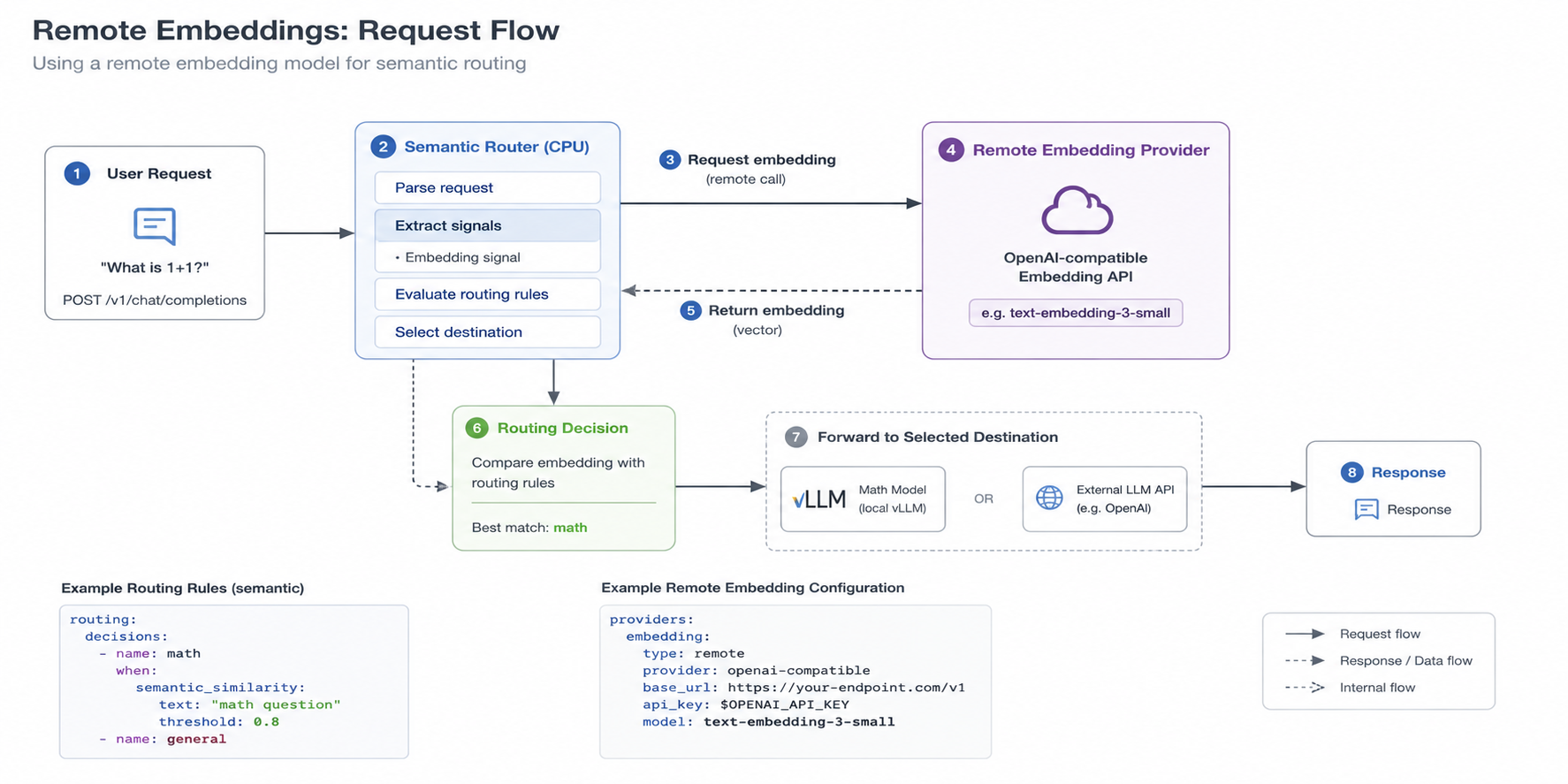
Step 1: Define semantic routing
routing:
  decisions:
    - name: math
      when:
        semantic_similarity:
          text: "math question"
          threshold: 0.8

    - name: general
Step 2: Send request
curl http://localhost:8888/v1/chat/completions \
  -d '{
    "model": "MoM",
    "messages": [{"role": "user", "content": "What is 1+1?"}]
  }'
Router will:
- Generate embedding
- Perform semantic matching
- Select target model
4. Step 0: Create an Embedding Model in Microsoft Foundry
Before integrating with vLLM Semantic Router, we first need to provision an embedding model in Microsoft Foundry.
4.1 Create a Foundry project
- Go to Microsoft Foundry Portal
- Create a new project (or select an existing one)
- Ensure the project is linked to an Azure subscription
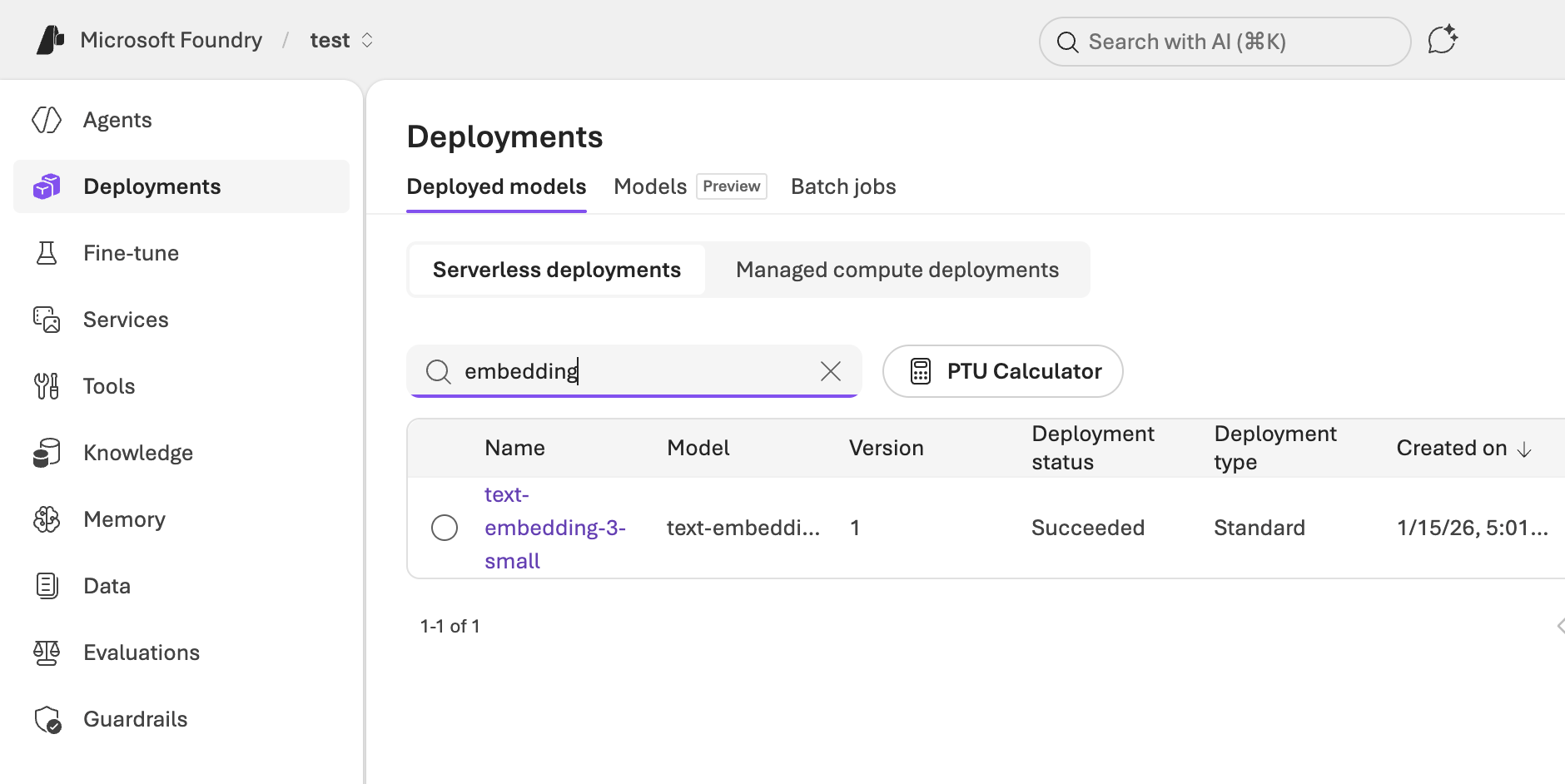
4.2 Deploy an embedding model
In the model catalog:
- Search for embedding models
- Select a supported model (e.g.
text-embedding-3-small) - Click Deploy
After deployment, you will get:
- Endpoint URL
- API Key
- Model name
Example:
Endpoint: https://<your-foundry-resource>.inference.ai.azure.com
Model: text-embedding-3-small
API Key: ******
4.3 Validate embedding API
You can test the endpoint directly:
curl https://<your-foundry-endpoint>/v1/embeddings \
  -H "api-key: <your-api-key>" \
  -H "Content-Type: application/json" \
  -d '{
    "input": "Hello world"
  }'
If successful, you will receive a vector response.
5. Upgrade: Replace Local Embedding with Microsoft Foundry
Now, we replace the embedding provider in the tutorial with:
✅ Microsoft Foundry embedding model
6. Why Microsoft Foundry Embedding
Microsoft Foundry provides:
- High-quality embeddings (stronger semantic understanding)
- Hosted API (no deployment required)
- Global availability + enterprise SLA
- Seamless integration with Azure AI ecosystem
More importantly:
It can directly serve as the “semantic brain” of Semantic Router
7. Integration: Microsoft Foundry as Remote Provider
7.1 Configure embedding provider
providers:
  embedding:
    type: remote
    provider: openai-compatible
    base_url: https://<your-foundry-endpoint>
    api_key: <your-api-key>
    model: text-embedding-3-small
Explanation:
- Foundry provides OpenAI-compatible API
- Can directly reuse semantic-router remote provider
- No additional adaptation required
7.2 Router workflow
User Request
   ↓
Semantic Router
   ↓
Microsoft Foundry Embedding API
   ↓
Vector Similarity
   ↓
Routing Decision
   ↓
Target Model (vLLM / API)
8. Key Improvement Over Tutorial
Compared to the official tutorial:
| Capability | Original Solution | Microsoft Foundry Solution |
|---|---|---|
| embedding source | local / mock | cloud high-quality model |
| deployment cost | model or container required | zero ops |
| scalability | single environment | multi-region |
| semantic quality | medium | enterprise-grade |
9. Real Impact
🚀 1. Truly “No GPU Architecture”
Router itself runs on CPU
embedding + inference are fully externalized:
- Foundry → embedding
- vLLM / API → inference
🧠 2. More accurate semantic routing
In tutorial scenarios:
"What is 1+1?" → math route
"Tell me a joke" → general route
With Foundry embedding:
- More stable semantic understanding
- Better multilingual support
- More accurate edge cases
🌐 3. Unified multi-model entry point
Combined with Semantic Router:
- Microsoft Foundry (embedding)
- vLLM (self-hosted inference)
- OpenAI / other APIs
Enables true:
Multi-Provider Intelligent Routing
10. Architectural Insight
The essence of this upgrade is:
Before:
Router = Infra + Intelligence

After:
Router = Intelligence
Foundry = AI Capability
Forming a clear layered architecture:
[ AI Capability Layer ] → Microsoft Foundry
[ Routing Layer       ] → Semantic Router
[ Inference Layer     ] → vLLM / APIs
11. Conclusion
By combining the official Remote Embeddings tutorial with Microsoft Foundry, we achieve a production-ready architecture:
- No local embedding required
- No GPU required
- High-quality semantic capability
- Enterprise-grade reliability
This is not just a feature enhancement, but a key evolution of Semantic Router:
From a “local tool” to a “cloud-native AI routing layer”